
Warehouse Boiler - Changing Times
The Vaillant boiler in the kitchen at Harrison court should look like this under the pull-down cover:
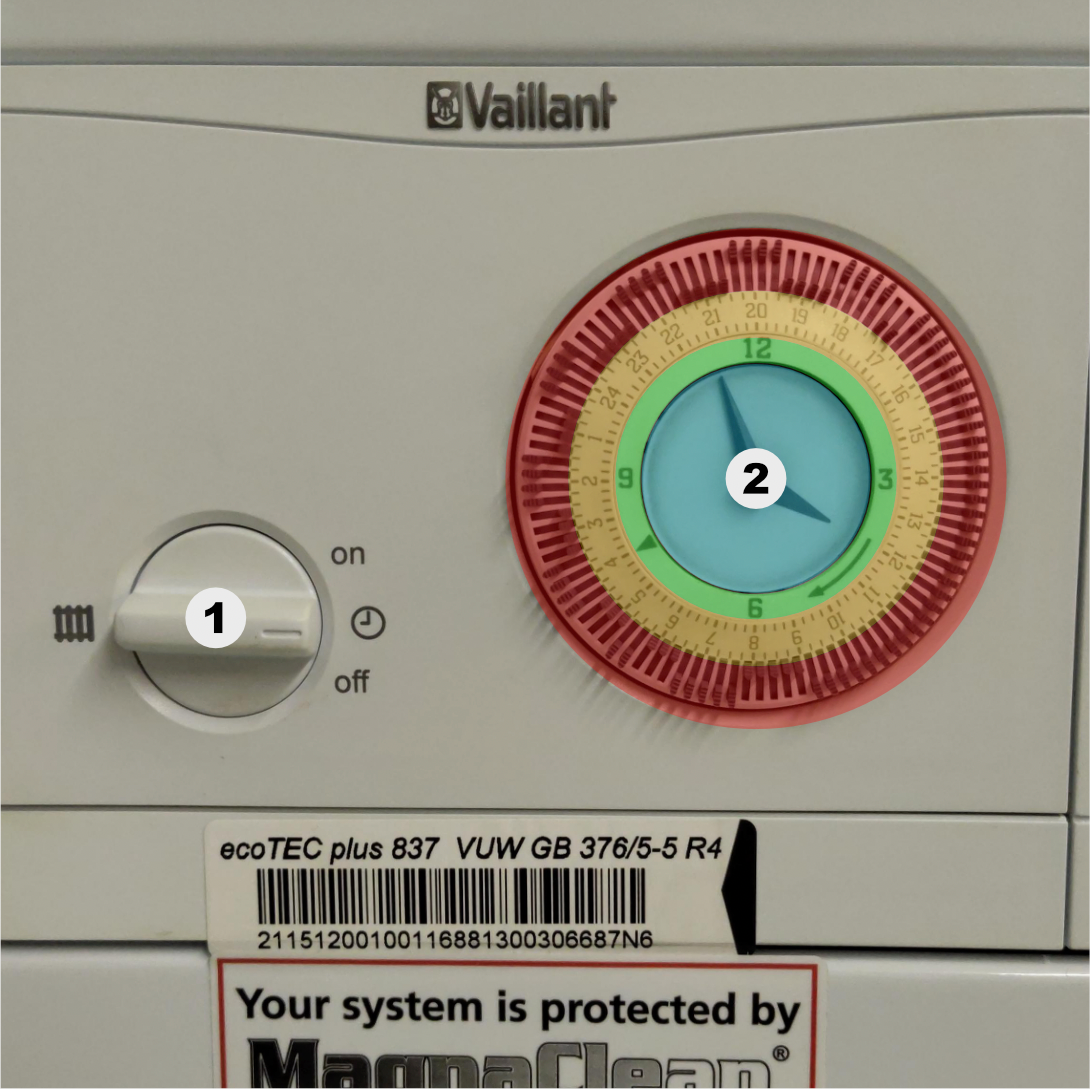
(1) - On-ness
Turn this to change whether the boiler is...
-
on: always on -
(clock): on based on the timer / clock to the right of this dial -
off: never on
(2) - The clock & timer controls
Note that the colours here are for informational purposes only; the actual boiler is not coloured like this.
blue (innermost; clockface)
The time the boiler currently thinks it is. Change by rotating the timer clockwise (the direction shown by the long arrow on the green section).
Video of the time being changed
green (major hour markers & arrows)
Doesn't move. Contains:
- hour markers for the clock
- direction pointer (the long arrow)
- "current heating period" check mark (the triangle at 08:30)
orange (1 - 24)
Also the time the boiler thinks it is, but as 24H representation.
When this clock dial is rotated, the aim is to get the green section's check mark to line up with what the current time is.
In the image, the check mark is pointing to 4, therefore the boiler's time is 4AM. If the mark was pointing to 16, the time would be 4PM.
red (mini paddle switches)
This section's switches can be put to point either inwards or outwards. Each switch represents a 15 minute span of time, lining up with the orange section's numbering and time divisions.
If inwards, the boiler will turn on in this timespan.
If outwards, the boiler will turn off in this timespan.